Deposit Due Report

The Deposit Due Report allows users to track the deposit due and the deposit paid for reservations and groups.

Perform the following steps to generate the report:

Navigate to Reports Dynamic Reports Guests/Reservations Deposit Due report.

Refer to the following table and fill in the fields.

Field

Description

Report Name

Deposit Due

Property

The property for which the report must be generated.

Start Date

The start date from which the report must be generated.

End Date

The end date up to which the report must be generated.

Type

This field will be displayed only when the Deposit policy for Group feature setting is enabled. Users can select the account type (reservation/group) for which the report must be generated.

View By

This is a single-select drop-down list that allows users to select the option for viewing the records in the generated report. Users can select from the following options:

  • Deposit Due Date: When selected, the records will be displayed in the ascending order of the due date for the deposits.

  • Arrival Date: When selected, the records will be displayed in the ascending order of the arrival date of the reservations and groups.

  • Booking Date: When selected, the records will be displayed in the ascending order of the date when the reservations were booked.

Click Run to generate the report.

Click Save to save the report under User Favorites section.

Sample Report
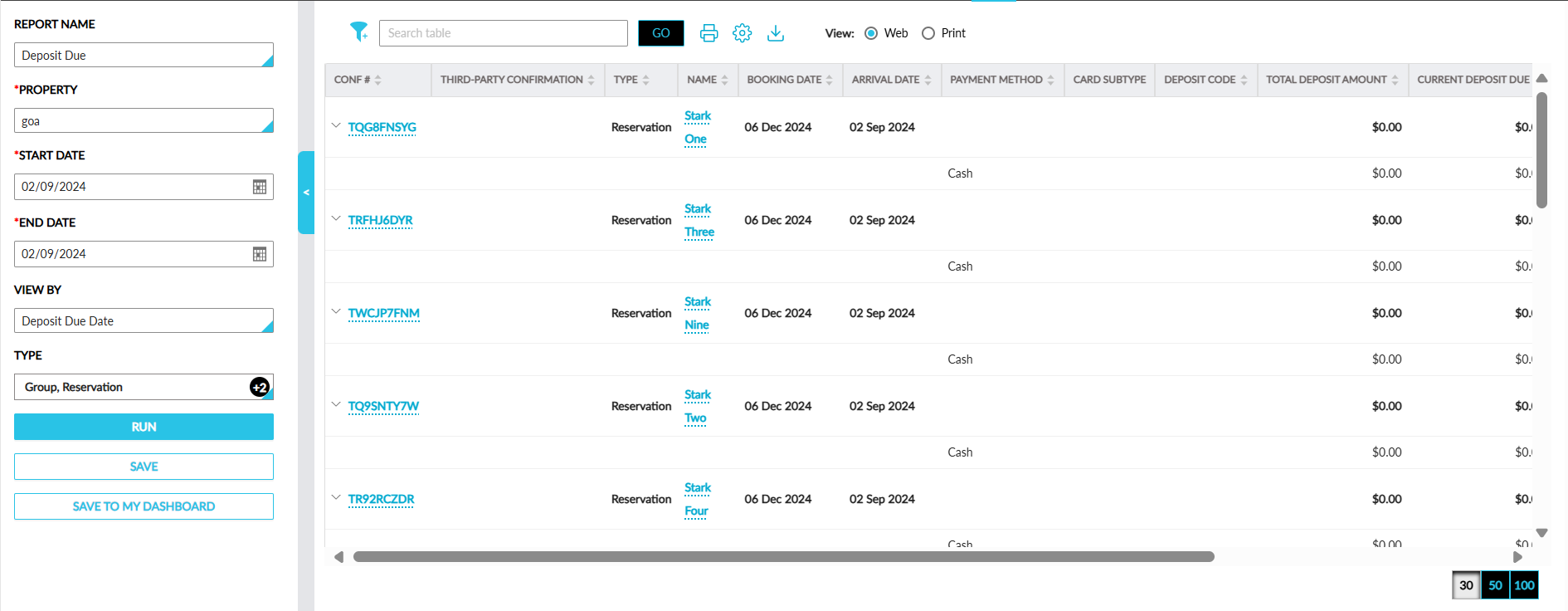
A screenshot of a computer

AI-generated content may be incorrect.

Report Fields

This report displays the following fields:

Field

Description

Conf #

  • Displays the confirmation ID of the reservation or the group code of the group for which the payment was successful.

  • When users expand the accordion, the latest deposit due is displayed at the top.

  • Users can search for a record using this value.

  • This column can be sorted.

Third-Party Confirmation

  • The third-party confirmation number for the reservation if available.

Name

  • Displays the guest name associated with a reservation or group for which the payment was successful.

  • Users can search for a record using this value.

  • This column can be sorted.

Booking Date

  • The date when the reservation was booked.

  • This column can be sorted.

Arrival Date

  • Displays the arrival date of the reservation or group, or the arrival shoulder date of the group for which the payment was successful.

  • This column can be sorted.

Payment Method

  • The payment method using which the deposit amount was collected.

  • This column can be sorted.

Deposit Code

  • The deposit code for each deposit due.

  • Users can filter and search records using this value.

  • This column can be sorted.

Total Deposit Amount

  • The total deposit amount calculated from the deposit policy.

  • This column can be sorted.

Current Deposit Due

  • The deposit due to be collected for each day in the selected date range.

  • This column can be sorted.

Due Date

  • The due date for each deposit due in the selected date range.

  • This column can be sorted.

Total Deposit Collected

  • The total deposit amount collected for each day in the selected date range.

  • This column can be sorted.

Last Collected Date

  • The latest date when the deposit amount was collected.

  • When multiple deposit dues were calculated, the date when the last due was collected will be displayed.

  • This column can be sorted.